
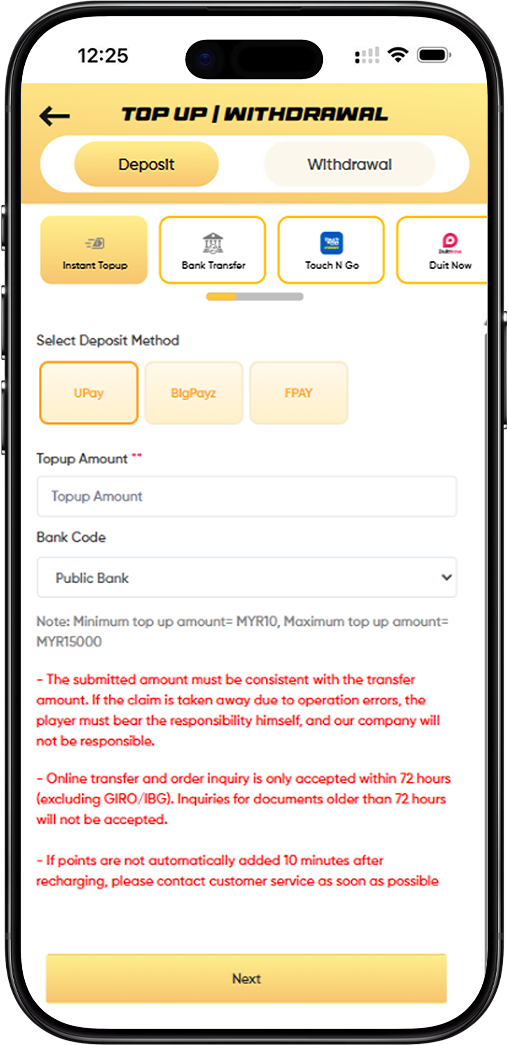
Multiple Deposit Methods for Your Convenience
LUCKYTOWN offers a wide variety of deposit methods to suit every player's preference. Choose from Instant Topup, Bank Transfer, Touch N Go, Duit Now, or USDT (TRC20). Each method is designed with your convenience and speed in mind, ensuring a seamless experience on the LUCKYTOWN platform.
Low Minimum Deposit to Start Playing
Start enjoying all the games at LUCKYTOWN with as little as a RM10 minimum deposit. Most methods offer a low minimum of RM10, with maximum limits varying by method, reaching up to RM20,000 for bank transfers.
Fast Processing for Immediate Play
Deposits at LUCKYTOWN are processed quickly to get you in the game. If your points are not automatically added within 10 minutes after recharging, our customer service team is ready to assist you immediately.
Step-by-Step Guide to Top Up at LUCKYTOWN
Step 1: Navigate to the Deposit Section
Log in to your LUCKYTOWN account. From the main dashboard, click on "Top Up" or "Deposit" to access the deposit page. The page is clearly titled "TOP UP / WITHDRAWAL" with the "Deposit" tab active and ready for you.
Step 2: Choose Your Preferred Deposit Method
Select your preferred deposit method from the available options clearly displayed at the top of the page:
- Instant Topup – For quick deposits via UPay, BigPayz, FPAY.
- Bank Transfer – For traditional online banking transfers.
- Touch N Go – For TNG e-wallet deposits.
- Duit Now – For Duit Now QR code deposits.
- USDT (TRC20) – For cryptocurrency deposits.
Step 3: Select the Specific Payment Provider
Depending on the main method you chose, you will then need to select the specific payment provider:
For Instant Topup:
- UPay – A popular and reliable instant payment option.
- BigPayz – An alternative instant payment provider.
- FPAY – Another convenient instant payment choice.
For Bank Transfer:
- Select your bank from the comprehensive list, which includes Public Bank, Maybank, CIMB Bank, Hong Leong, RHB Bank, AmBank, Bank Simpanan Nasional, Bank Islam, and others.
For Touch N Go:
- Choose from Touch 'n Go, Boost, GrabPay, ShopeePay, Maybank QR as your funding source.
For Duit Now:
- Select DuitNow as your method, which works with providers like UPay and BigPayz.
For USDT:
- Choose from BINANCE, Huobi, or Others depending on where you are sending your cryptocurrency from.
Step 4: Enter Your Top-Up Amount
Enter the amount you wish to deposit in the "Topup Amount" field. Please carefully note the minimum and maximum limits for your chosen method:
- Instant Topup (UPay/BigPayz/FPAY): Min RM10, Max RM15,000
- Bank Transfer: Min RM20, Max RM20,000
- Touch N Go: Min RM10, Max RM2,500
- Duit Now: Min RM10, Max RM2,500
- USDT: Enter amount in USDT. The estimated MYR amount will be displayed based on the current rate (e.g., 4.12).
Step 5: Review All Important Notices
Before proceeding, it is crucial to carefully read all important notices displayed on the deposit page for your chosen method to ensure a smooth transaction.
For Bank Transfer:
- Name Matching: If the real name on your LUCKYTOWN account and your bank transfer account name are inconsistent, the company has the right to reject the application.
- Reference Format: Please specify LT-(your username) on the transfer slip (e.g., ID: luckytown, Refer: LTluckytown).
- Bank Account Changes: Our company changes bank accounts from time to time. Always confirm the account with your bank before initiating a transfer.
- Withdrawal Name Matching: Ensure your withdrawal account holder name matches your top-up account holder name.
Fraud Prevention – Restricted Remarks:
If the following words appear in your transfer remarks, reviews will be stricter and top-ups may fail: Sales/Purchases, Rent/Loan, Telecommunication station, Currency exchange, Medical supplies, Clothing supply, Electronic products, Transportation, Car parts, Motor parts, Luxury/Famous brand, Concert tickets/Coupons, Foods/Snacks/Fruits/Drink/Books and others.
General Notices:
- The submitted amount must be consistent with the transfer amount. Operation errors are the player's responsibility.
- Online transfer and order inquiries are accepted within 72 hours (excluding GIRO/IBG). Documents older than 72 hours are not accepted.
- QR code transfer and order inquiries are accepted within 48 hours only.
- If points are not automatically added 10 minutes after recharging, contact customer service immediately.
- If the player saves a QR code to recharge or uses an old QR code during maintenance, the recharge amount cannot be checked and may be lost.
USDT Specific Notices:
- USDT top-ups are based on the first customer who submits the order – later submissions are invalid.
- If a transfer is made but the top-up order is not submitted within 30 minutes, it is considered invalid.
- Time is based on platform wallet time to avoid disputes.
- The platform reserves the right to make changes without notice.
Step 6: Click "Next" to Proceed
After selecting your method, entering the correct amount, and reviewing all the important notices, click the "Next" button at the bottom of the page to proceed with your deposit.
Step 7: Complete the Transfer as Instructed
Follow the specific instructions provided on the next screen based on your chosen deposit method:
- Bank Transfer: Copy the displayed LUCKYTOWN account number, complete the transfer via your banking app, then return to upload the receipt.
- Touch N Go / Duit Now: Scan the generated QR code and complete the payment in your e-wallet app.
- USDT: Scan the QR code, complete the transfer in your crypto wallet, and then copy and paste the TXID into the provided field.
Step 8: Confirmation and Processing
After completing the transfer, return to LUCKYTOWN if needed (for receipt upload). The system will automatically process your deposit. If your points are not added within 10 minutes, please contact our customer service immediately for assistance.
Deposit Methods Summary at LUCKYTOWN
Quick Reference Table
Instant Topup (UPay/BigPayz/FPAY)
- Min: RM10, Max: RM15,000
- Processing: Within 10 minutes
- Inquiry period: 72 hours
Bank Transfer
- Min: RM20, Max: RM20,000
- Banks: Public, Maybank, CIMB, Hong Leong, RHB, AmBank, BSN, Bank Islam
- Inquiry period: 72 hours
Touch N Go
- Min: RM10, Max: RM2,500
- Options: TNG, Boost, GrabPay, ShopeePay, Maybank QR
- Inquiry period: 48 hours
Duit Now
- Min: RM10, Max: RM2,500
- Options: UPay, BigPayz
- Inquiry period: 48 hours
USDT (TRC20)
- Rate: Updated regularly (e.g., 4.12)
- Platforms: Binance, Huobi, Others
- Order submission required within 30 minutes of transfer.
Frequently Asked Questions About Top Up at LUCKYTOWN
What is the minimum deposit amount at LUCKYTOWN?
The minimum deposit is RM10 for Instant Topup, Touch N Go, and Duit Now. For Bank Transfer, the minimum is RM20.
How long do deposits typically take to process?
Most deposits at LUCKYTOWN are processed within 10 minutes. If your points are not added after 10 minutes, please contact our customer service team.
What payment methods are available for top up?
LUCKYTOWN offers a wide range of methods, including Instant Topup (UPay, BigPayz, FPAY), Bank Transfer, Touch N Go (with Boost, GrabPay, ShopeePay, Maybank QR), Duit Now, and USDT (TRC20).
Why might my top-up request be rejected?
Common reasons for rejection include: a name mismatch between your bank account and your LUCKYTOWN account, using restricted remarks in the transfer, or the amount transferred being inconsistent with the amount submitted.
What kind of remarks should I avoid in my bank transfer?
Avoid any commercial or suspicious remarks such as Sales, Rent, Currency exchange, Medical supplies, Electronics, Luxury items, Concert tickets, etc. Using these can trigger stricter reviews and may lead to failure.
Can I use a saved QR code for future deposits?
No. Using saved QR codes or old QR codes, especially during maintenance, may result in the loss of your funds. Always generate a fresh, unique QR code for each new deposit at LUCKYTOWN.
What is the deadline for submitting a USDT deposit order?
For USDT deposits at LUCKYTOWN, you must submit your top-up order within 30 minutes of completing the transfer. Submissions made after this window are considered invalid.
How will I know if my deposit was successful?
You will receive an in-app confirmation, and the deposited points will be credited to your account. You can always verify this by checking your transaction history.
Who should I contact if I have issues with my deposit?
If your points are not added within 10 minutes of recharging, please contact LUCKYTOWN customer service immediately through the app's Helpdesk or live chat for prompt assistance.
Top Up at LUCKYTOWN Today!
Ready to play? Choose your preferred deposit method at LUCKYTOWN – Instant Topup, Bank Transfer, Touch N Go, Duit Now, or USDT. Enjoy low minimums, fast processing, and secure transactions.
Top Up Now at LUCKYTOWN