
Fast and Secure Cryptocurrency Deposits for LUCKYTOWN Members
LUCKYTOWN offers USDT as a modern and efficient way to top up your account. Using USDT on the TRC20 network provides fast transaction times, low fees, and enhanced security. Your deposits are converted to MYR at competitive rates, giving you excellent value for your cryptocurrency within the LUCKYTOWN ecosystem.
Multiple Platform Options Available at LUCKYTOWN
Choose from popular cryptocurrency platforms including Binance, Huobi, or any other USDT-compatible wallet. LUCKYTOWN supports deposits from all major platforms that support USDT (TRC20) transfers, offering you flexibility and convenience.
Quick Processing Within 10 Minutes at LUCKYTOWN
Once your USDT transfer is confirmed on the blockchain and you submit your TXID, the LUCKYTOWN finance department processes your deposit within 10 minutes. You will receive an immediate confirmation once your funds are credited to your account.
Competitive USDT to MYR Conversion Rate at LUCKYTOWN
LUCKYTOWN offers competitive USDT to MYR conversion rates. In the example shown, the rate is 4.32, meaning 1000 USDT converts to 4320 MYR. Please note that rates may vary slightly based on current market conditions.
Step-by-Step Guide to USDT Top Up at LUCKYTOWN

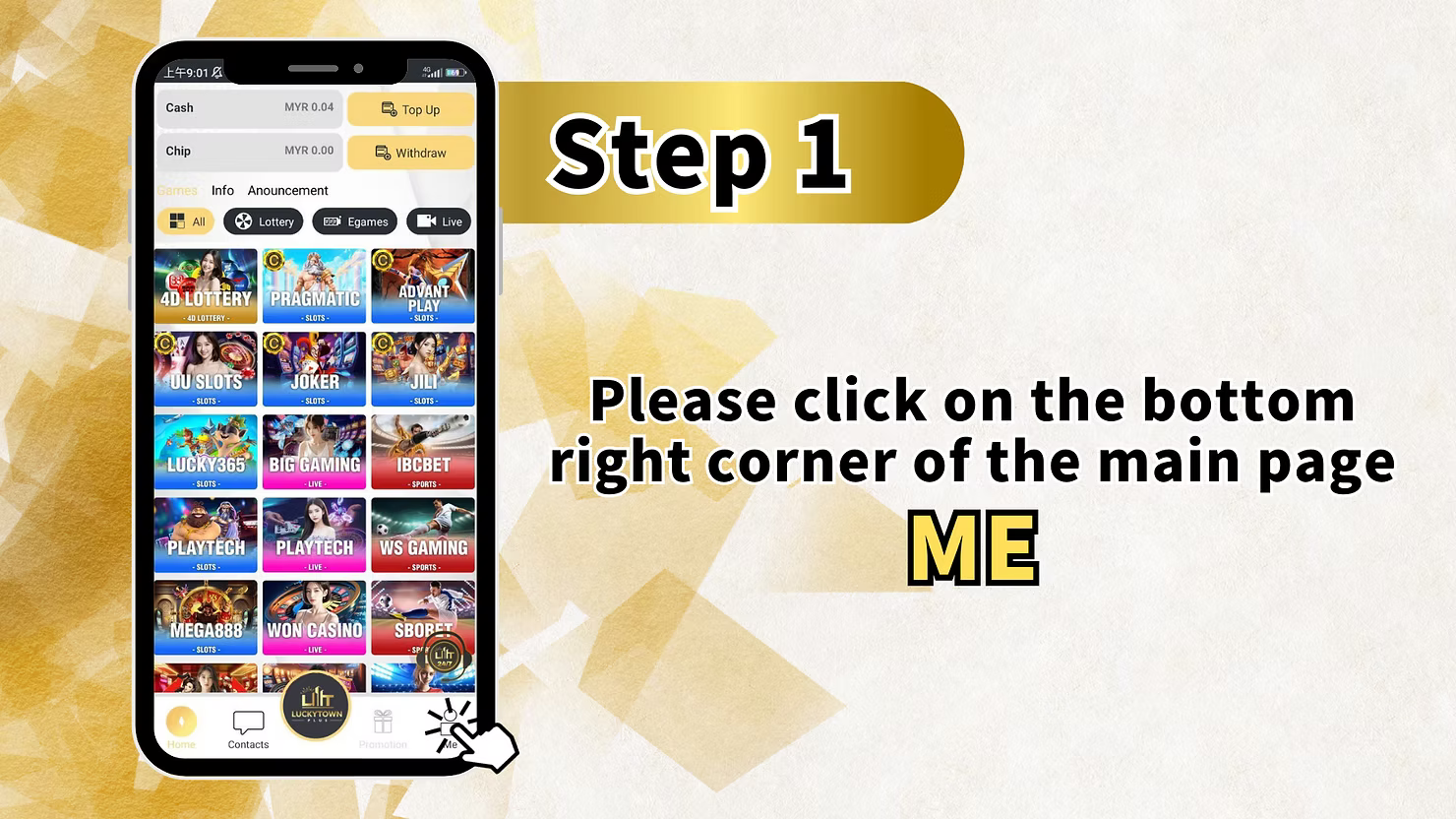
Step 1: Access Your LUCKYTOWN Account
Tap on "ME" in the Bottom Right Corner
Open the LUCKYTOWN app on your mobile device. On the main page, locate the bottom right corner and tap on "ME" to access your personal account dashboard. This is your central hub for all account management tasks.
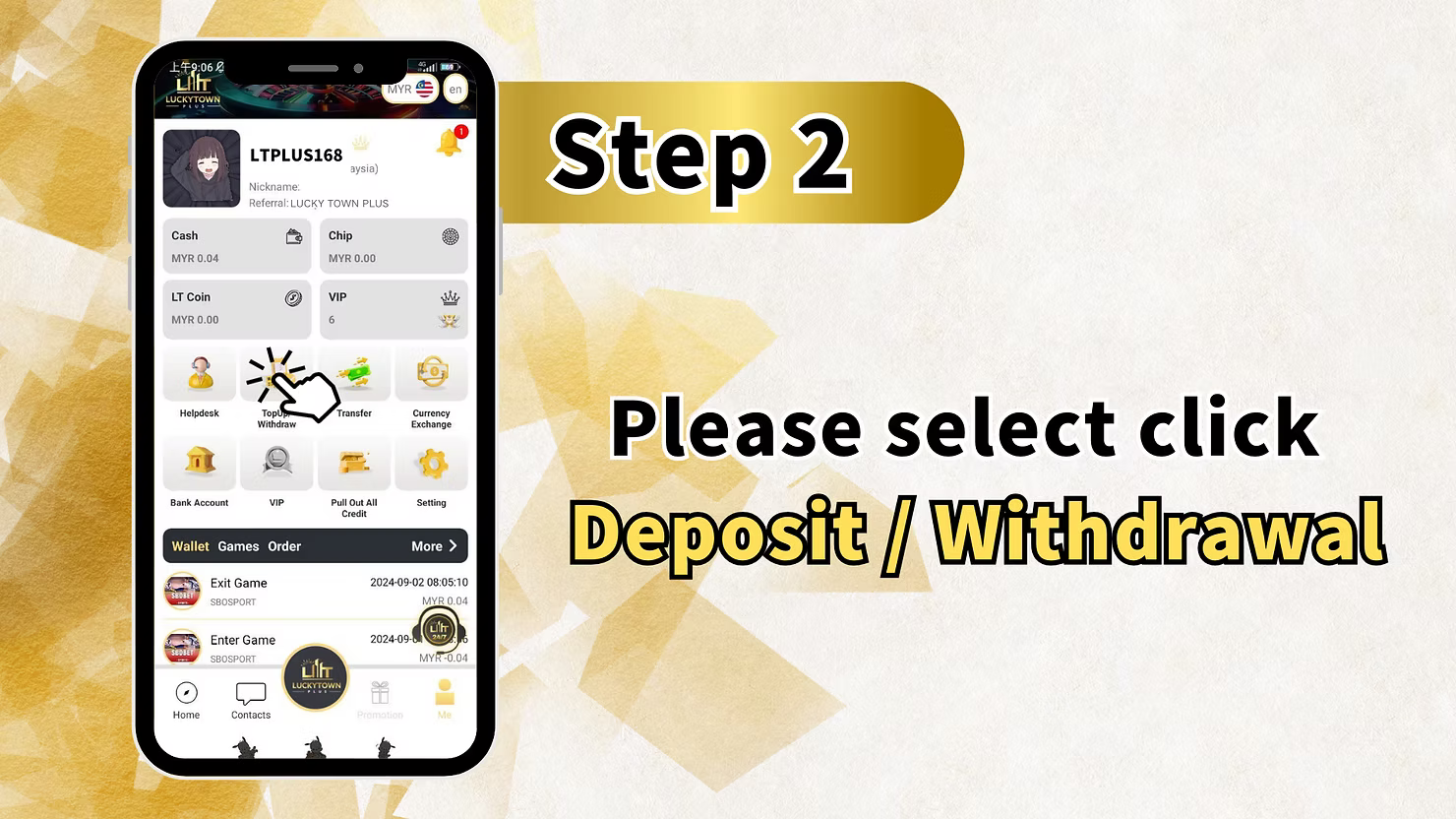
Step 2: Navigate to Deposit/Withdrawal
Select "Deposit / Withdrawal" from the Menu
From the "ME" menu, tap on "Deposit / Withdrawal". This will take you to the funds management page, where you can choose to top up or withdraw funds from your LUCKYTOWN account.
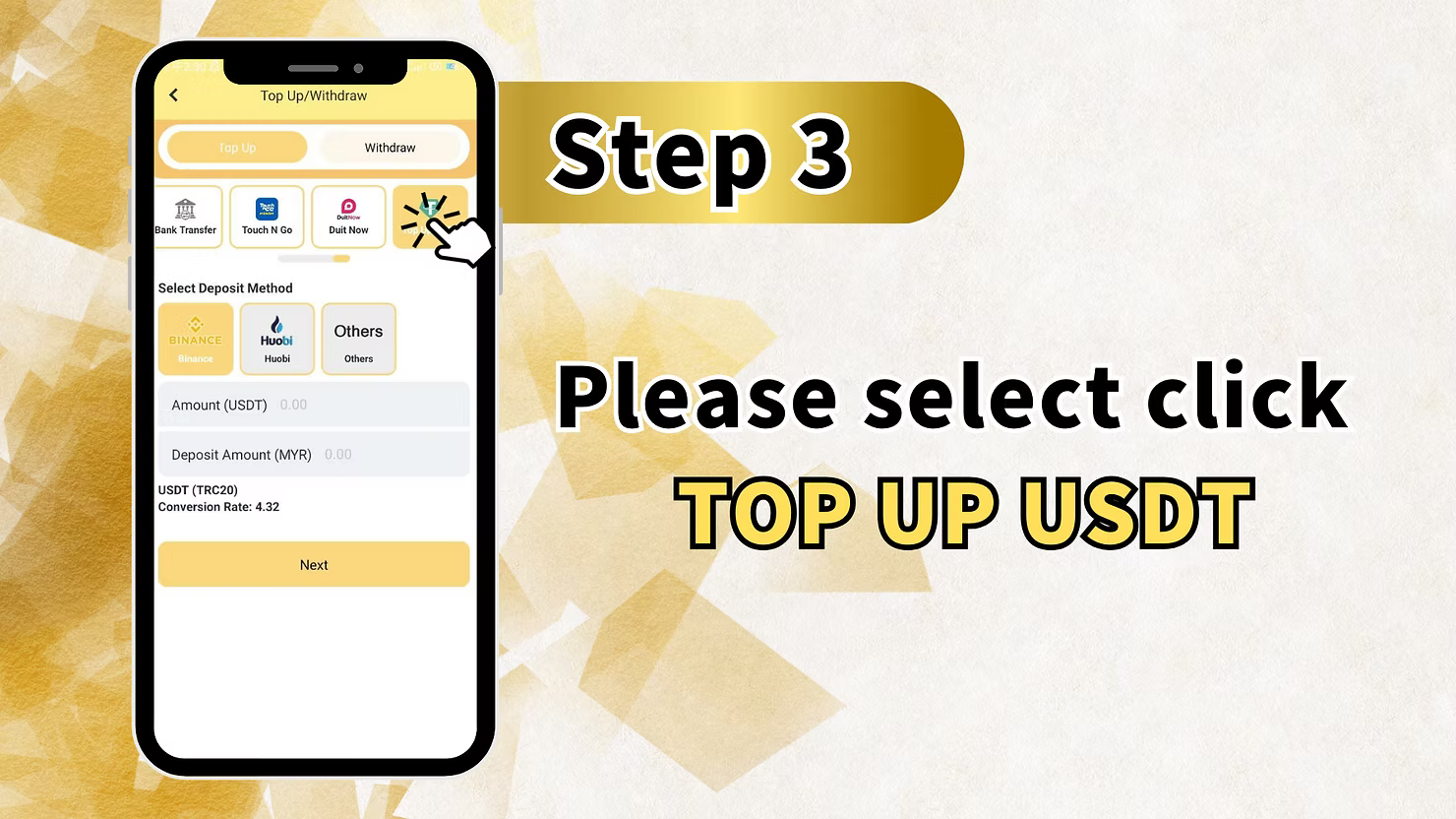
Step 3: Select USDT as Your Deposit Method
Choose USDT from the Available Options
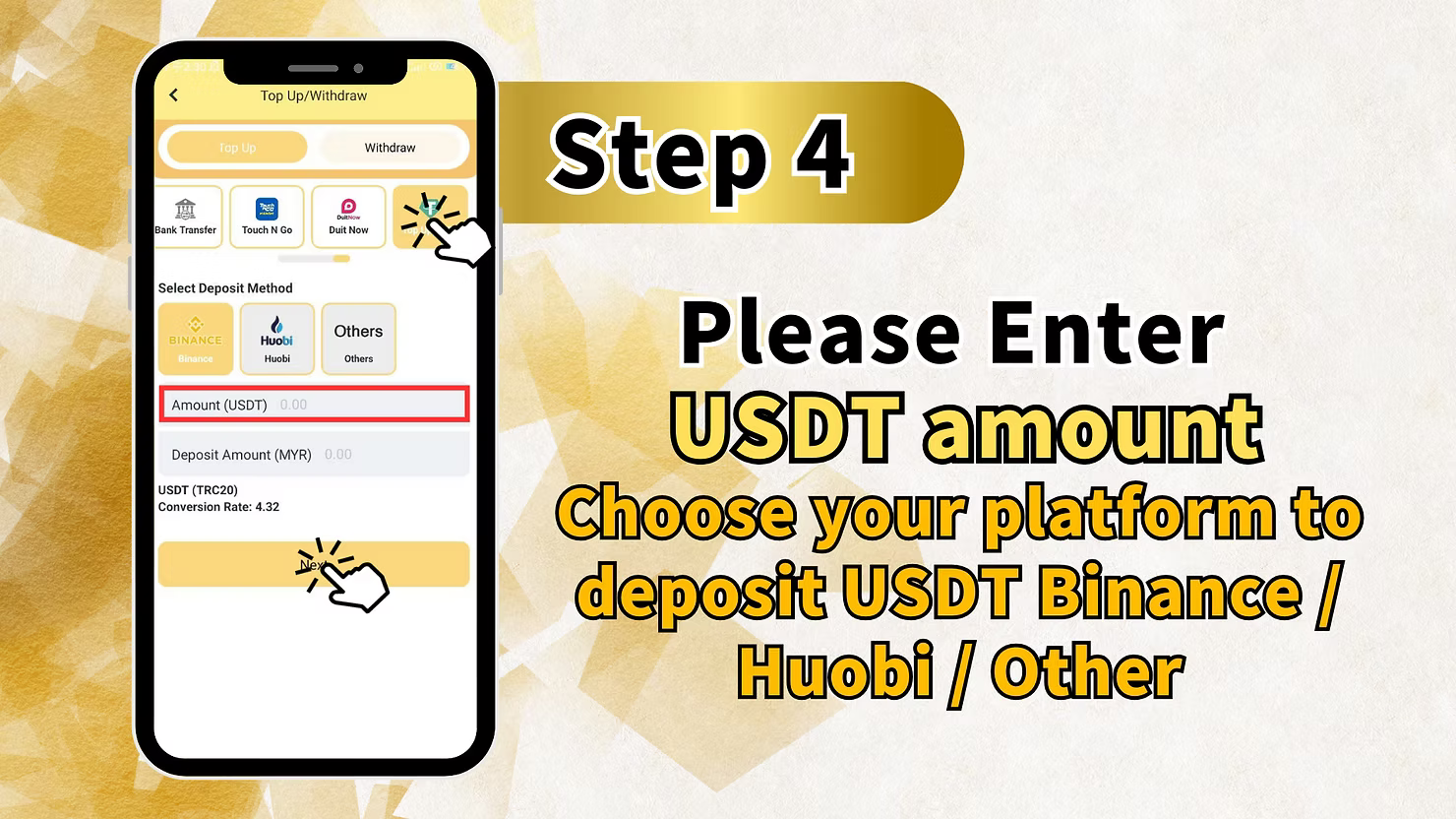
On the Top Up/Withdraw page, you will see various deposit methods, including bank transfer, Touch N Go, and Duit Now. Scroll to find the USDT section. You will see options for:
- BINANCE – Select this if you are depositing from Binance.
- Huobi – Select this if you are depositing from Huobi.
- Others – Select this for any other USDT-compatible wallets.
Enter Your Deposit Amount in USDT
In the Amount (USDT) field, enter how much USDT you wish to deposit. The system will automatically calculate the equivalent Deposit Amount (MYR) based on the current conversion rate displayed.
- USDT (TRC20) network is used for all transfers.
- The Conversion Rate is shown (example: 4.32).
- The MYR amount updates automatically as you enter the USDT amount.
Tap Next to Proceed
After selecting your platform and entering the amount, tap "Next" to continue with the deposit process at LUCKYTOWN.
Step 4: Review Your Deposit Details
Confirm Your Platform and Amount
Carefully review your deposit information for accuracy:
- The USDT amount you are depositing.
- The platform you selected (Binance, Huobi, or Other).
- The estimated MYR amount after conversion.
Ensure all information is correct before proceeding to the next step.
Step 5: Complete USDT Transfer and Submit Your TXID
Scan the QR Code to Initiate Transfer
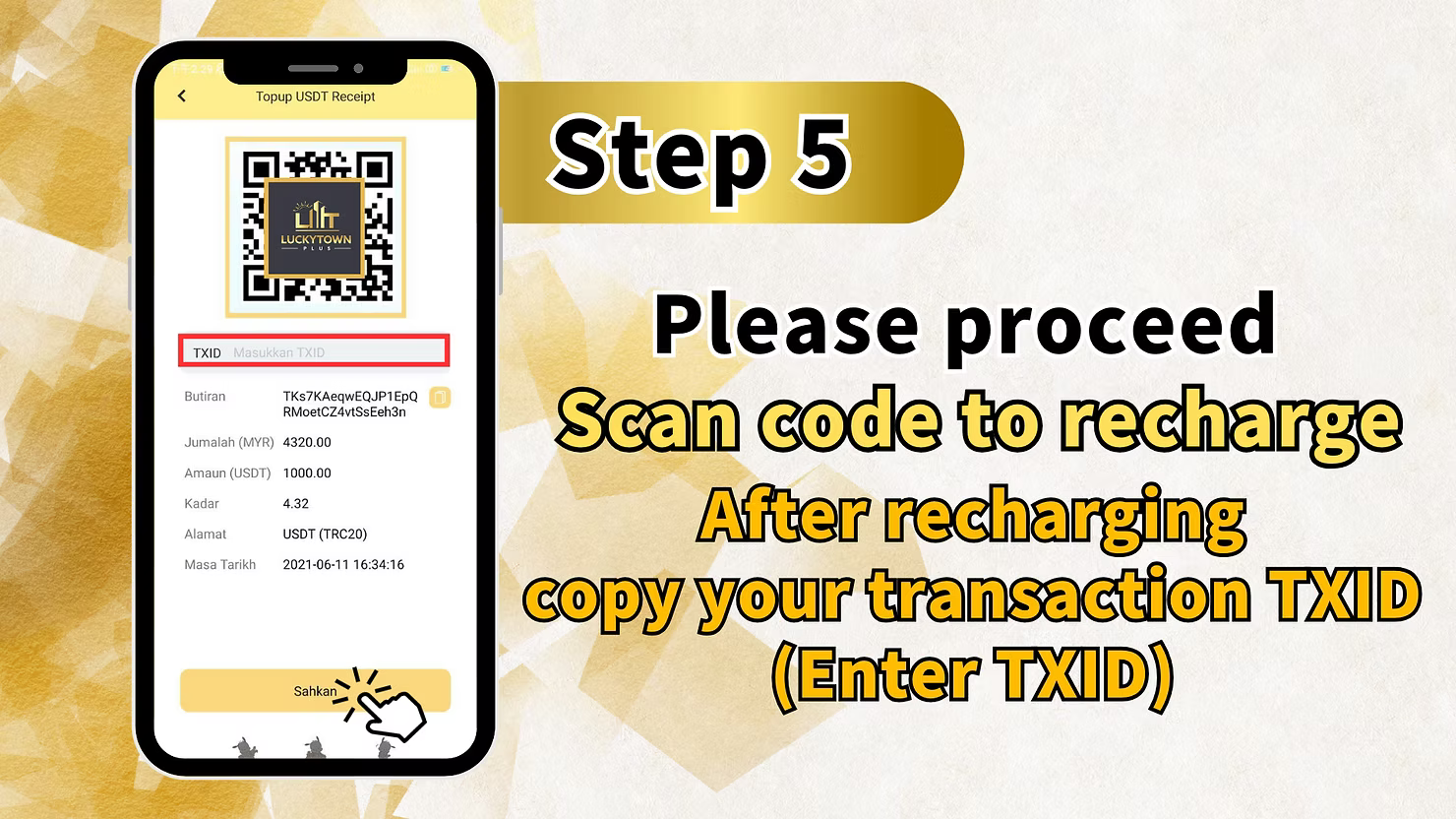
LUCKYTOWN will now display a unique QR code specifically for your USDT deposit. Use your cryptocurrency wallet app (Binance, Huobi, etc.) to scan this QR code and complete the USDT transfer for the exact amount you specified.
Copy Your Transaction TXID
After successfully completing the USDT transfer in your wallet app, you will receive a Transaction TXID (Transaction ID). This is a unique identifier for your transaction on the blockchain.
Copy your TXID carefully – you will need to enter this in the LUCKYTOWN app to verify your deposit.
Enter Your TXID in the LUCKYTOWN App
Return to the LUCKYTOWN app and locate the field labeled:
- "TXD" or "Masukkan TXID" (Enter TXID)
Paste or carefully type your copied TXID into this field. The system will use this ID to verify your transaction on the blockchain.
Review Your Complete Transaction Details
You will now see a comprehensive summary of your deposit for final verification:
- TXID: TK9KAeqwEQJP1EpQRMoetCZ4vtSsEeh3n (example)
- Jumlah (MYR): 4320.00 (example)
- Amaun (USDT): 1000.00 (example)
- Kadar (Rate): 4.32 (example)
- Alamat (Address): USDT (TRC20)
- Masa Tarikh (Date Time): 2021-06-11 16:34:16 (example)
Confirm and Submit Your Deposit Request
After verifying that all details are correct, tap "Sahkan" (Confirm) to submit your USDT deposit request to LUCKYTOWN.
Step 6: Wait for Processing and Confirmation
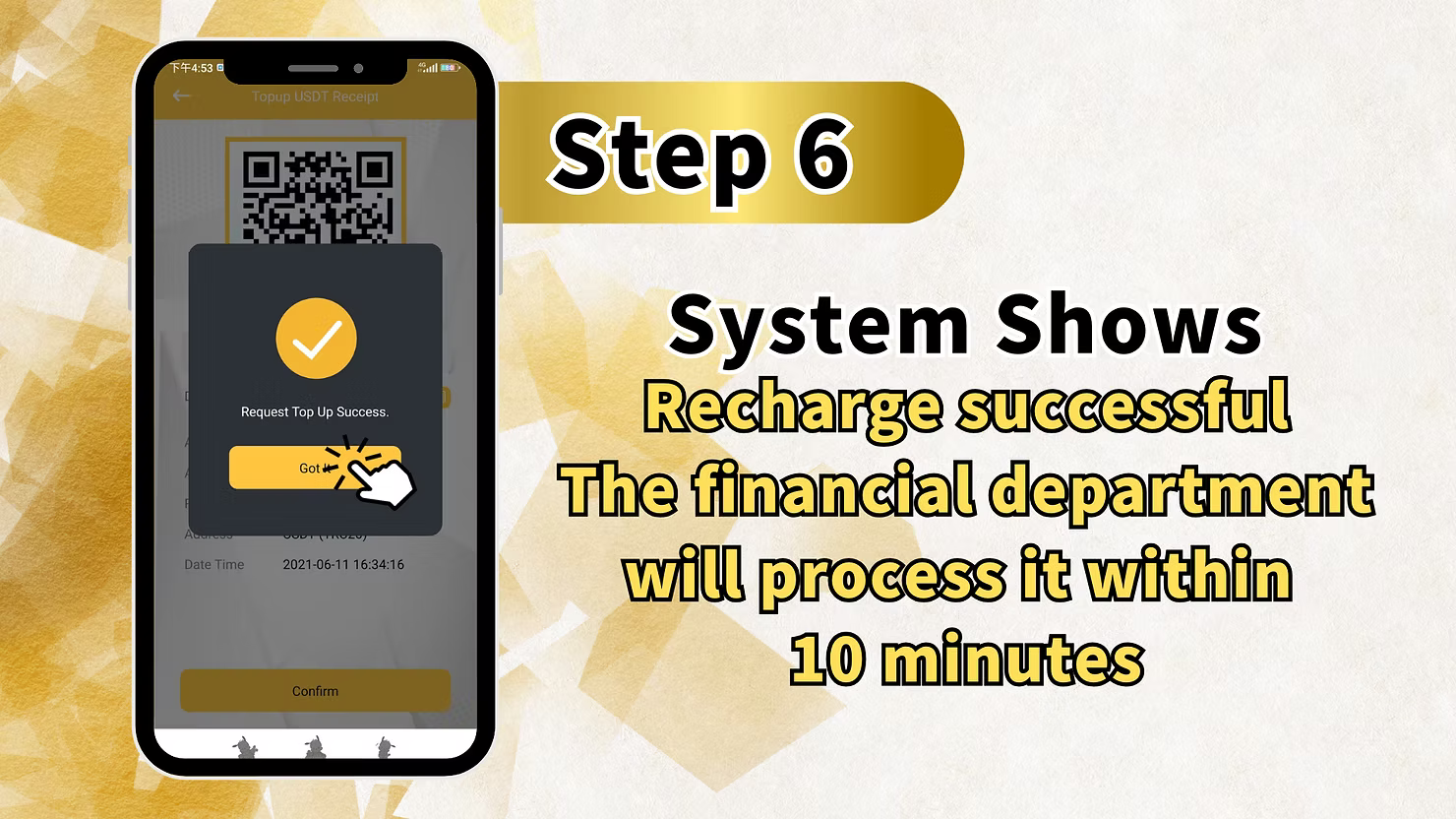
System Confirmation of Successful Submission
After submitting, the LUCKYTOWN system will display a confirmation message indicating that your recharge request has been successfully received:
- "Request Top Up Success"
- "Got ❤️" (confirmation message)
- The Date Time of your submission.
Processing Time by LUCKYTOWN Finance
The finance department at LUCKYTOWN will process your USDT deposit within 10 minutes. Your account will be credited with the equivalent MYR amount once the transaction is fully verified on the blockchain.
Summary of USDT Top Up Steps at LUCKYTOWN
Quick Reference Checklist for LUCKYTOWN Members
Here is a quick summary of the USDT top-up process at LUCKYTOWN for your easy reference:
1. Tap ME (bottom right corner).
2. Select Deposit / Withdrawal.
3. Choose USDT and select your
platform (Binance/Huobi/Others).
4. Enter the USDT amount (MYR equivalent is auto-calculated).
5. Tap
Next.
6. Scan the QR code with your crypto wallet and complete the transfer.
7. Copy the TXID from
your wallet after the transfer.
8. Enter the TXID in the app and tap Sahkan (Confirm).
9. Wait for
processing – the finance department completes it within 10 minutes.
Understanding USDT Deposit Details at LUCKYTOWN
USDT Network: TRC20 is Required
LUCKYTOWN accepts USDT deposits exclusively on the TRC20 network (Tron blockchain). This version of USDT is known for its fast transactions and low fees. Please ensure your wallet supports TRC20 USDT before initiating a transfer.
USDT to MYR Conversion Rate
The USDT to MYR conversion rate is clearly displayed during the deposit process. In the example provided, the rate is 4.32, meaning 1 USDT = 4.32 MYR. Rates are updated regularly based on prevailing market conditions to ensure fairness.
TXID Verification is Essential
The Transaction TXID is your definitive proof of payment on the blockchain. LUCKYTOWN uses this unique ID to verify your transfer and credit your account. Always keep your TXID for your records until the deposit is fully processed.
Important Notes for Successful USDT Top Up at LUCKYTOWN
Use the Correct Network (TRC20)
Always ensure you are sending USDT on the TRC20 network. Sending USDT on other networks (such as ERC20, BEP20, etc.) may result in the permanent loss of your funds.
Verify Your Platform Selection
Select the correct platform (Binance, Huobi, or Others) that matches where you are sending your USDT from. This helps LUCKYTOWN track your deposit accurately and efficiently.
Keep Your TXID Safe Until Processing is Complete
Your TXID is essential for verifying your deposit. Please save it in a secure place until your deposit is fully processed and the funds are credited to your LUCKYTOWN account.
Adhere to the Processing Time Guideline
While blockchain transactions themselves may take a few minutes to confirm, the LUCKYTOWN finance department processes all verified deposits within 10 minutes of TXID submission.
Frequently Asked Questions About USDT Top Up at LUCKYTOWN
What is USDT?
USDT (Tether) is a stablecoin cryptocurrency that is pegged to the value of the US Dollar. LUCKYTOWN accepts USDT on the TRC20 network for deposits, which are then converted to MYR at competitive rates for your gameplay.
Which USDT network does LUCKYTOWN accept?
LUCKYTOWN accepts USDT exclusively on the TRC20 network (Tron blockchain). Please ensure your wallet or exchange supports TRC20 USDT before initiating any transfer.
What platforms can I use to send USDT to LUCKYTOWN?
You can send USDT from Binance, Huobi, or any other wallet that supports USDT (TRC20) transfers. Simply select the corresponding option in the deposit form at LUCKYTOWN.
How is the USDT to MYR conversion rate determined?
The conversion rate is displayed prominently during the deposit process and is based on current market rates. LUCKYTOWN strives to offer competitive rates for all cryptocurrency deposits.
What is a TXID and why is it required?
A TXID (Transaction ID) is a unique identifier for your specific transaction on the blockchain. LUCKYTOWN requires it to verify your transfer and credit your account. Always copy and enter it accurately.
How long does USDT deposit processing take at LUCKYTOWN?
Once you submit your TXID, the LUCKYTOWN finance department processes your deposit within 10 minutes. Please note that initial blockchain confirmation times may add a few minutes to the overall process.
What if I enter the wrong TXID?
If you enter an incorrect TXID, your deposit may not be verified. Please contact LUCKYTOWN customer support immediately with the correct TXID and all relevant transaction details for assistance.
Is there a minimum USDT deposit amount?
Please check the LUCKYTOWN app for the most current minimum deposit requirements. The example shows 1000 USDT, but minimum amounts may vary based on platform policies and market conditions.
Can I deposit USDT from any cryptocurrency wallet?
Yes, you can deposit USDT from any wallet, as long as it supports the TRC20 network. If your wallet is not Binance or Huobi, simply select the "Others" option in the platform selection.
What should I do if my USDT deposit isn't credited after 10 minutes?
If your deposit is not credited within 10 minutes after you have submitted your TXID, please contact LUCKY TOWN online customer service immediately for prompt assistance and resolution.
Top Up with USDT at LUCKYTOWN Today!
Ready to experience fast and secure cryptocurrency deposits? Follow our comprehensive step-by-step USDT guide to top up your LUCKYTOWN account now. Choose Binance, Huobi, or other platforms, scan the QR code, and get your deposit processed within 10 minutes. Start playing with USDT today!
Top Up with USDT at LUCKYTOWN