

Secure Your Withdrawals from LUCKYTOWN
Adding a bank account to your LUCKYTOWN profile is an essential step for secure and hassle-free withdrawals. By linking your personal bank account, you ensure that all your winnings are processed safely and reach the correct, verified destination every time.
Strengthen Fraud Prevention at LUCKYTOWN
For the utmost safety of our customers' funds, LUCKYTOWN requires all withdrawals to be made to bank accounts that match the verified name on your profile. Adding your bank account is a key part of this fraud prevention strategy, helping to protect you from unauthorized transactions.
Enable Fast and Convenient Transactions with LUCKYTOWN
Once your bank account is successfully added and verified, all future withdrawals become faster and more convenient. Your account details are securely stored, streamlining the process for your next cash-out from the LUCKYTOWN platform.
Step-by-Step Guide to Add a Bank Account at LUCKYTOWN


Step 1: Access Your LUCKYTOWN Account
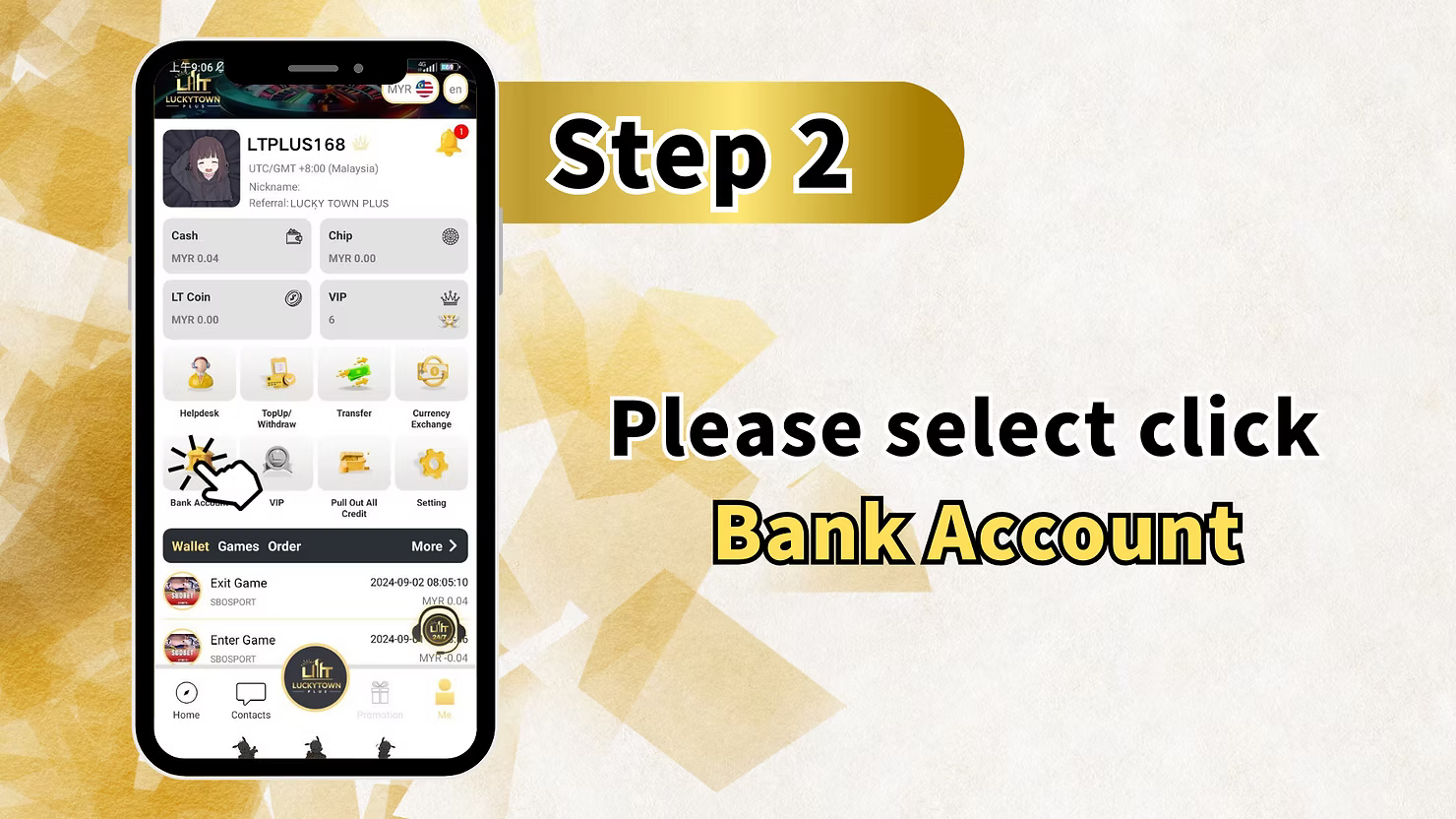
Tap on "ME" in the Bottom Right Corner
Open the LUCKYTOWN app on your mobile device. On the main page, locate the bottom right corner and tap on "ME" to access your personal account dashboard. This is your central hub for all account management tasks.
Step 2: Navigate to the Bank Account Section
Select "Bank Account" from the Menu
From the "ME" menu, look for and tap on "Bank Account". This action will take you to the dedicated bank account management page, where you can view any existing accounts or add new ones.
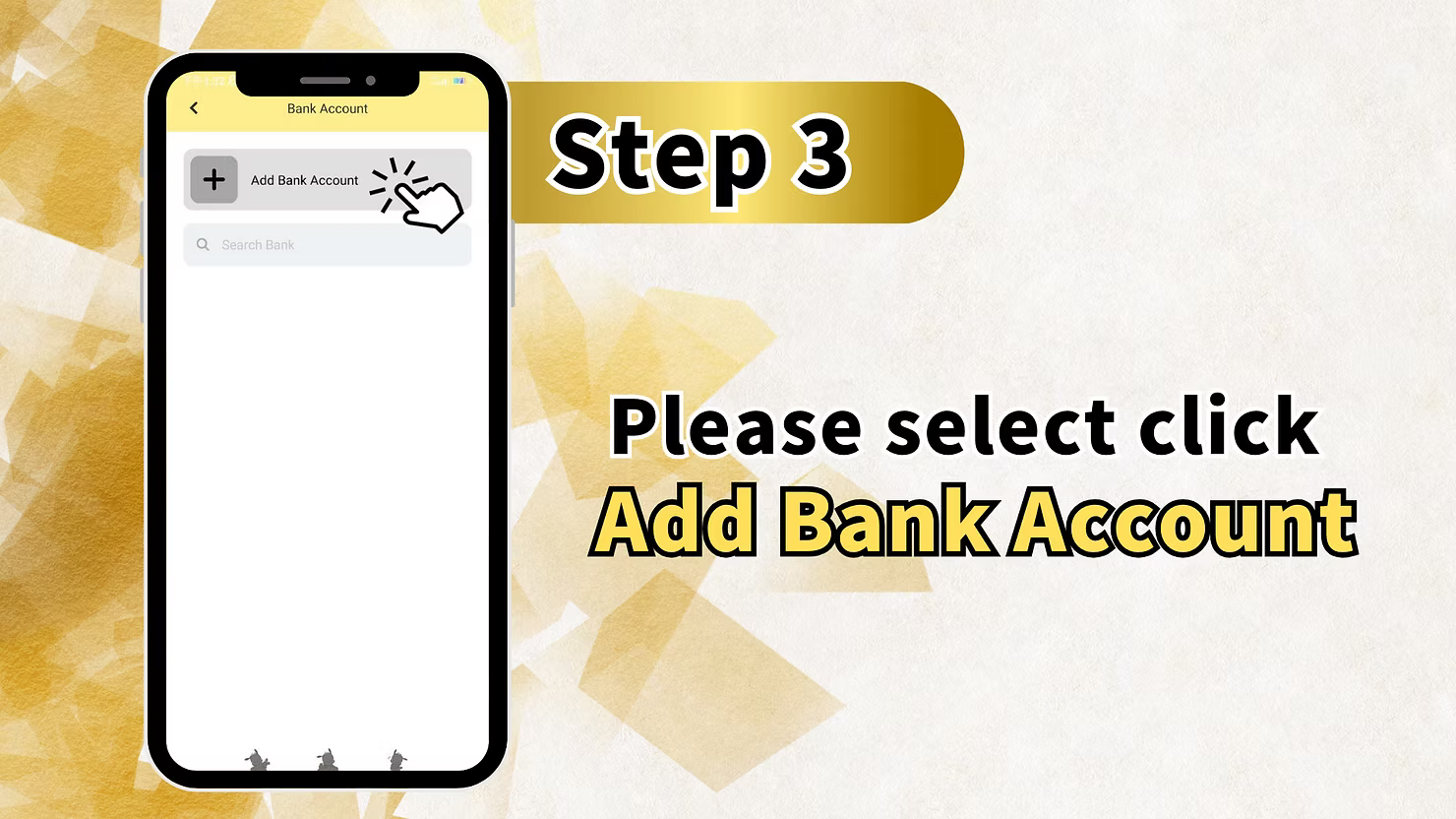
Step 3: Start the Process to Add a Bank Account
Tap "Add Bank Account"
On the Bank Account page, you will see an option to "Add Bank Account". Tap this to begin the process of linking your personal withdrawal account to LUCKYTOWN.
You may also see a "Search Bank" field – this handy feature allows you to quickly find your specific bank from the list.
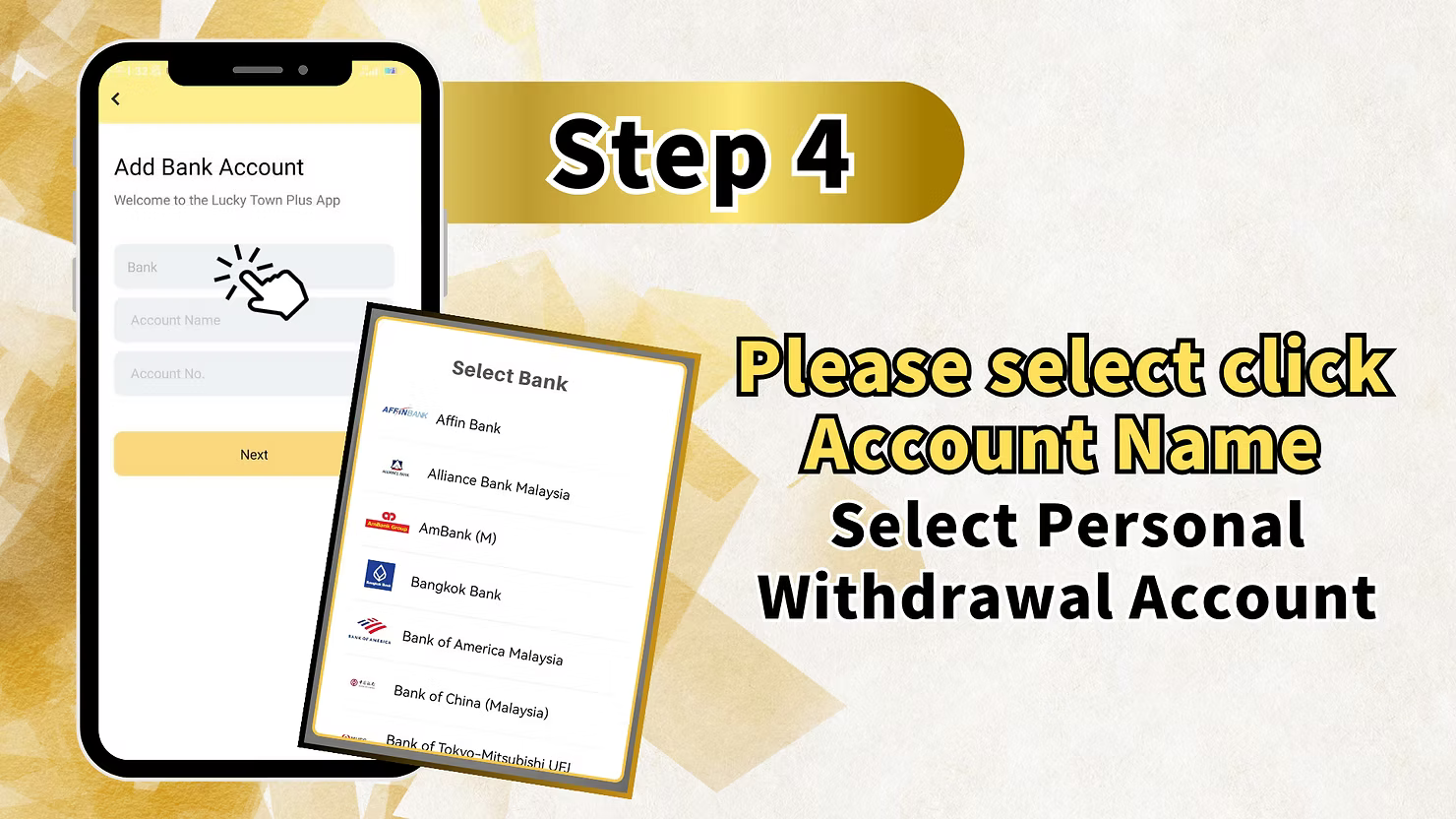
Step 4: Select Your Bank from the Supported List
Choose Your Bank from Malaysia's Leading Banks
LUCKYTOWN supports a wide range of Malaysian banks. Scroll through the comprehensive list or use the search function to find your bank quickly. The available banks include:
- Affin Bank
- Alliance Bank Malaysia
- AmBank (M)
- Bangkok Bank
- Bank of America Malaysia
- Bank of China (Malaysia)
- Bank of Tokyo-Mitsubishi UFJ
- CIMB Bank
- Hong Leong Bank
- Maybank
- Public Bank
- And many other major Malaysian banks.
Tap on your specific bank name to select it for this addition.
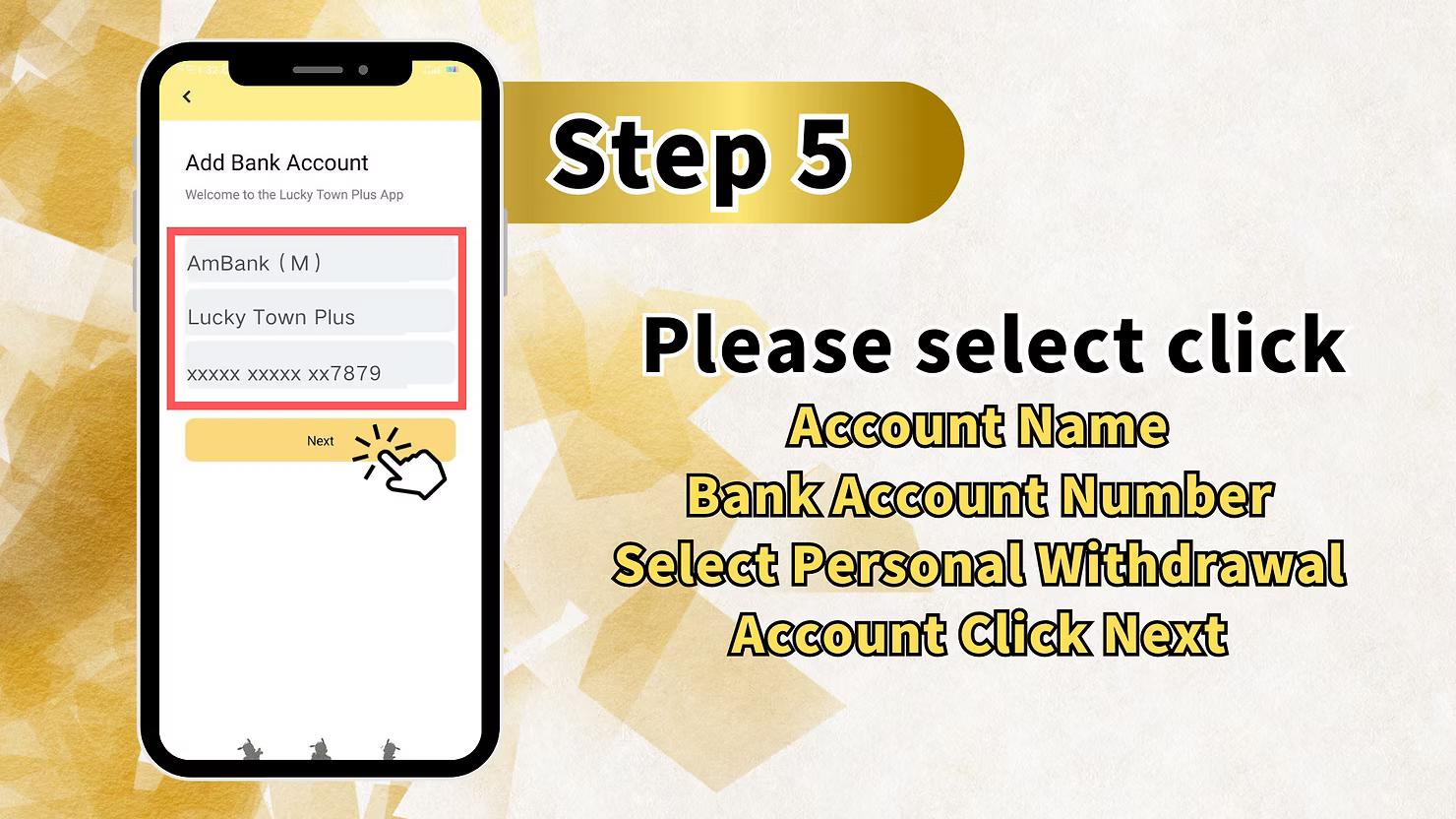
Step 5: Enter Your Bank Account Details
Fill in Your Account Information Accurately
After selecting your bank, you will need to provide your personal account details carefully:
- Account Name: Enter the name exactly as it appears on your bank account statements. This must match your verified real name on your LUCKYTOWN profile.
- Account No.: Enter your bank account number carefully. Double-check for any errors, as this is critical for successful withdrawals.
In the example shown, the account details appear as:
- AmBank (M) – the selected bank
- Lucky Town Plus – account name (example)
- xxxxxxxxxxxxxx7879 – account number (masked for security)
Verify Your Details Before Proceeding
Take a moment to review all entered information to ensure 100% accuracy. Any mistakes at this stage could delay future withdrawals or, in rare cases, cause funds to be sent to an incorrect account.
Tap "Next" to Continue
After confirming your bank selection, account name, and account number are correct, tap "Next" to proceed to the security verification step.
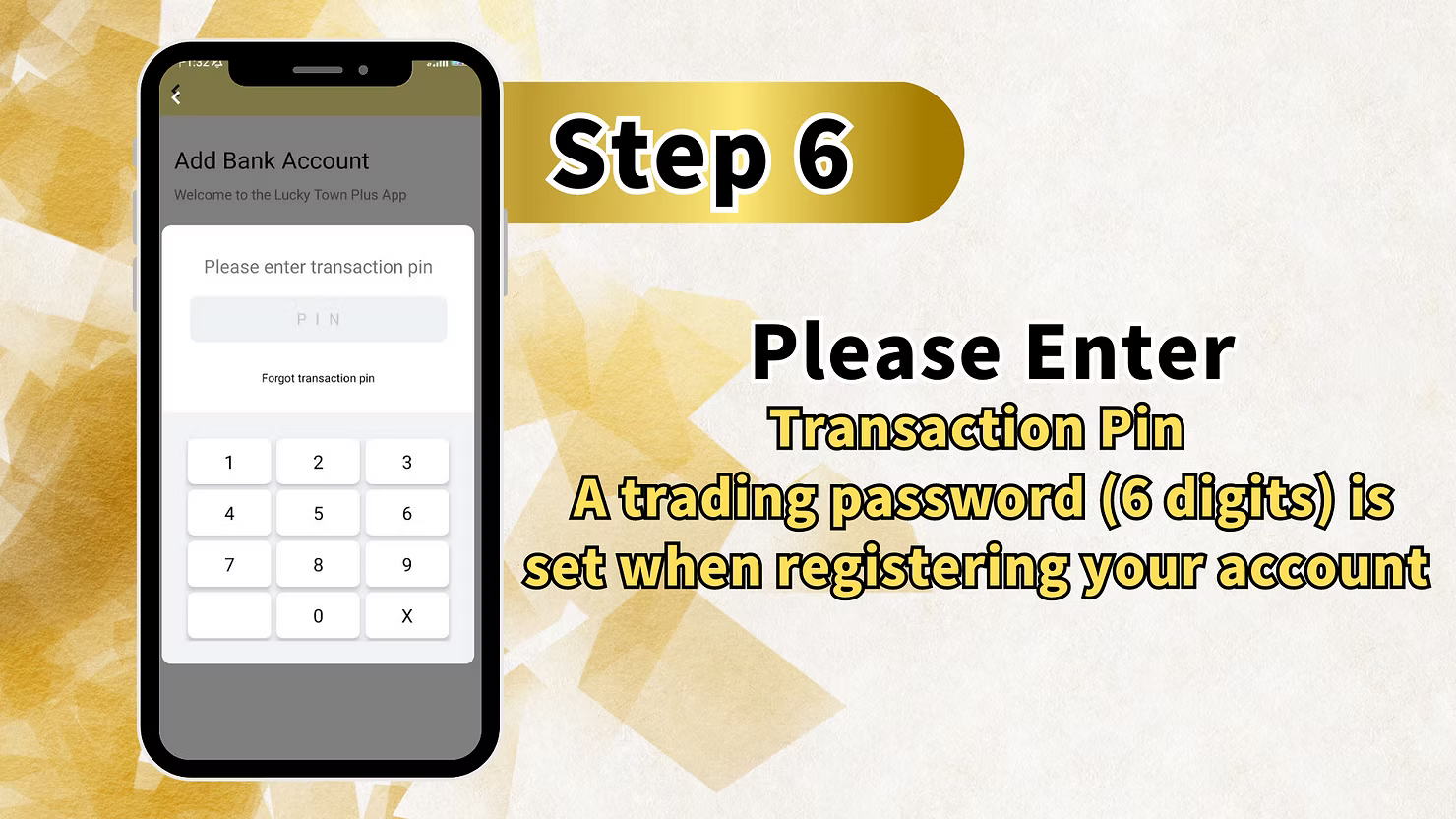
Step 6: Enter Your 6-Digit Transaction PIN
Verify Your Identity Securely
To ensure the highest level of account security, LUCKYTOWN requires you to enter your Transaction PIN before adding a new bank account.
- Enter your 6-digit transaction PIN using the on-screen numeric keypad.
- This PIN is the same one you set up during your initial LUCKYTOWN account registration.
If you have forgotten your transaction PIN, tap the "Forgot transaction pin" link. You will then be guided through the secure account recovery process to reset it.
The PIN pad will display numbers 0-9 and an "X" for making corrections if needed.
Important Security Note for LUCKYTOWN Members
Your transaction PIN is a critical security feature. Never share it with anyone, and always ensure you are in a private and secure location when entering it.
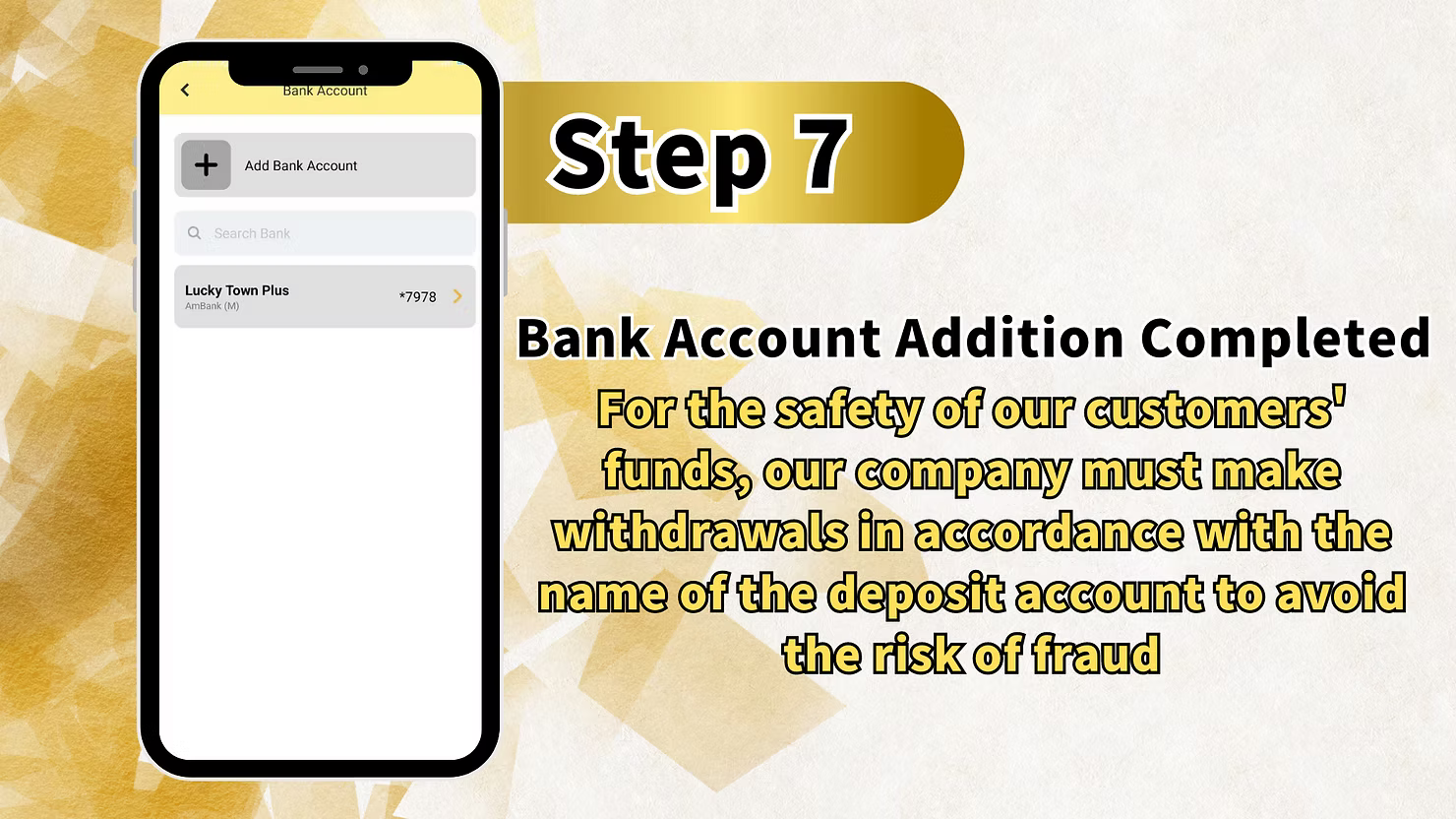
Step 7: Bank Account Addition Completed
Confirmation and Important Security Notice
Once you have successfully entered your correct transaction PIN, your bank account addition is complete. You will see a confirmation message on the screen.
Important Security Notice:
"For the safety of our customers' funds, our company must make withdrawals in accordance with the name of the deposit account to avoid the risk of fraud."
This policy means that all withdrawals from LUCKYTOWN can only be made to bank accounts that exactly match the verified name on your profile. This measure protects both you, the member, and the platform from any fraudulent activities.
Summary of Steps to Add a Bank Account at LUCKYTOWN
Quick Reference Checklist for LUCKYTOWN Members
Here is a quick summary of the process to add a bank account at LUCKYTOWN for your easy reference:
- Tap ME (bottom right corner).
- Select Bank Account.
- Tap Add Bank Account.
- Search for and select your specific bank from the list.
- Enter your Account Name and Account Number accurately.
- Tap Next.
- Enter your 6-digit Transaction PIN.
- Confirmation message – your bank account has been successfully added.
Important Notes for Adding a Bank Account at LUCKYTOWN
Account Name Must Match Your Verified Profile
The Account Name you enter must exactly match your verified real name on your LUCKYTOWN profile. Any discrepancy, even a small one, may result in withdrawal issues or account verification problems later.
Double-Check Your Account Number for Accuracy
Bank account numbers are highly sensitive. Carefully enter and verify your account number at least twice before submitting. An incorrect number could potentially send your funds to the wrong account.
Keep Your Transaction PIN Absolutely Secure
Your 6-digit transaction PIN is essential for account security. Memorize it and never share it with anyone. LUCKYTOWN will never ask for your PIN outside of these secure, in-app interfaces.
Wide Range of Supported Banks at LUCKYTOWN
LUCKYTOWN supports most major Malaysian banks. If your specific bank is not listed, please check with our customer support team for availability or for alternative withdrawal methods.
Frequently Asked Questions About Adding Bank Accounts at LUCKYTOWN
Why do I need to add a bank account?
Adding a bank account is a mandatory requirement for processing withdrawals at LUCKYTOWN. It ensures your funds are sent to a secure, verified account that is registered in your legal name.
Which banks are supported by LUCKYTOWN?
LUCKYTOWN supports a wide range of Malaysian banks, including Affin Bank, Alliance Bank, AmBank, Bangkok Bank, Bank of America Malaysia, Bank of China (Malaysia), Bank of Tokyo-Mitsubishi UFJ, CIMB, Hong Leong Bank, Maybank, Public Bank, and many others.
What if my bank is not listed in the app?
If your bank is not currently listed, please contact LUCKYTOWN customer support to check on its availability or to inquire about alternative withdrawal options that may be suitable for you.
What is a transaction PIN and why is it needed?
A transaction PIN is a unique 6-digit security code you set during your LUCKYTOWN account registration. It is required to authorize sensitive operations, such as adding a new bank account and processing withdrawals, to ensure it's really you.
What if I have forgotten my transaction PIN?
If you have forgotten your transaction PIN, simply tap the "Forgot transaction pin" link on the PIN entry screen. You will then be guided through the secure account recovery process to reset it.
Can I add more than one bank account to my profile?
LUCKYTOWN may allow members to add multiple bank accounts. Please check the app for specific options or contact customer support for detailed guidance.
How will I know that my bank account was added successfully?
You will receive a clear on-screen confirmation message, such as "Bank Account Addition Completed," immediately after successfully entering your transaction PIN.
Is my bank account information secure with LUCKYTOWN?
Yes. LUCKYTOWN uses industry-standard encryption and robust security measures to protect your sensitive bank account information. Your data is handled in strict accordance with our privacy policies.
Can I change or update my bank account details later?
Yes, you can update or change your linked bank account information at any time through the Bank Account section. Please note that any changes may require re-verification with your transaction PIN.
Why must the withdrawal account name match my deposit account name?
This strict policy is a critical fraud prevention measure. It ensures that funds are only ever sent to accounts that are in the verified legal name of the account holder, protecting both you and LUCKYTOWN from unauthorized transactions.
Add Your Bank Account to LUCKYTOWN Today!
Secure your withdrawals and enjoy peace of mind by adding your bank account to LUCKYTOWN now. Follow our simple step-by-step guide, choose your bank from the extensive list, enter your details, and verify with your transaction PIN. It's fast, secure, and easy – get started today!
Add Bank Account at LUCKYTOWN