
Secure Your LUCKYTOWN Account and Transactions
Real name verification at LUCKYTOWN is a critical security measure designed to protect your account and ensure all your transactions are safe. By verifying your identity, you confirm that you are the legitimate owner of the account, which helps prevent fraud, unauthorized access, and maintains the integrity of the LUCKYTOWN community.
Unlock Full Features of Your LUCKYTOWN Account
Completing real name verification at LUCKYTOWN grants you access to all platform features. This includes the ability to make withdrawals, perform top-ups, and enjoy exclusive VIP privileges. Verified accounts benefit from higher transaction limits and faster processing times for all financial requests.
Compliance with Regulations at LUCKYTOWN
LUCKYTOWN adheres to industry regulations and best practices to provide a safe and fair gaming environment. Real name verification helps us comply with legal requirements and maintain the highest standards of platform integrity for every member of the LUCKYTOWN family.
Step-by-Step Guide to Real Name Verification at LUCKYTOWN


Step 1: Access the "Me" Section
Navigate to Your Personal Dashboard
Open the LUCKYTOWN app on your mobile device. On the main page, locate the bottom right corner and tap on "ME". This action will take you to your personal account dashboard, the central hub for managing your profile.
Explore Your LUCKYTOWN Dashboard
Once you are in the "Me" section, you will see various important options and information related to your account. These include:
- Cash: Your current cash balance available for play.
- Chip: Your chip balance, used for specific games.
- Games: Quick access to all game categories.
- Info: Important account information.
- Announcement: Latest platform news and updates from LUCKYTOWN.
You will also find quick action buttons for Top Up and Withdraw, as well as access to all game categories like 4D LOTTERY, PRAGMATIC, JOKER, JILI, BIG GAMING LIVE, IBCBET SPORTS, and more.
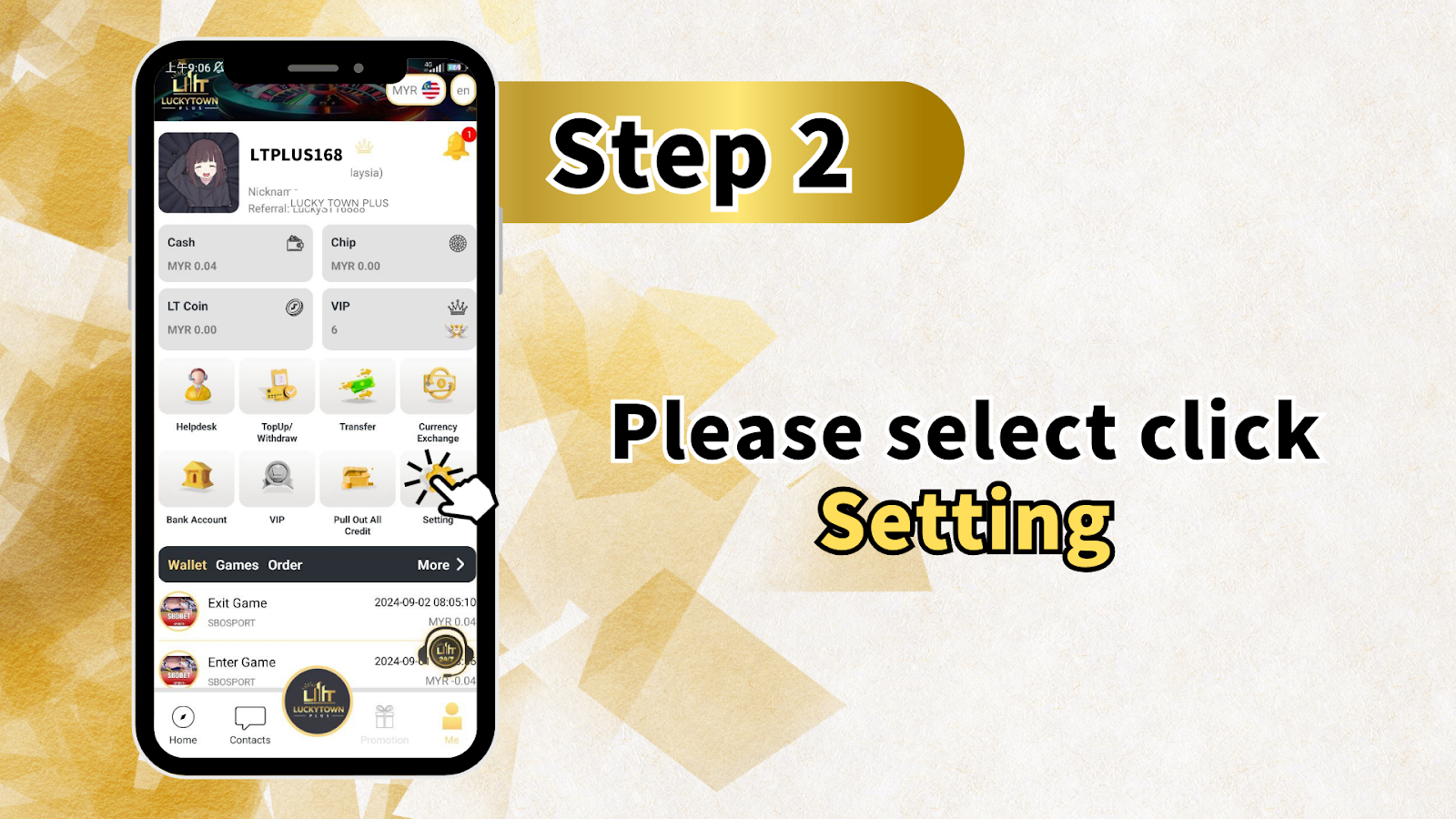
Step 2: Go to Settings
From the "Me" section, locate and tap on "Setting". This will open the settings menu, where you can manage various aspects of your LUCKYTOWN account, including security and profile options.
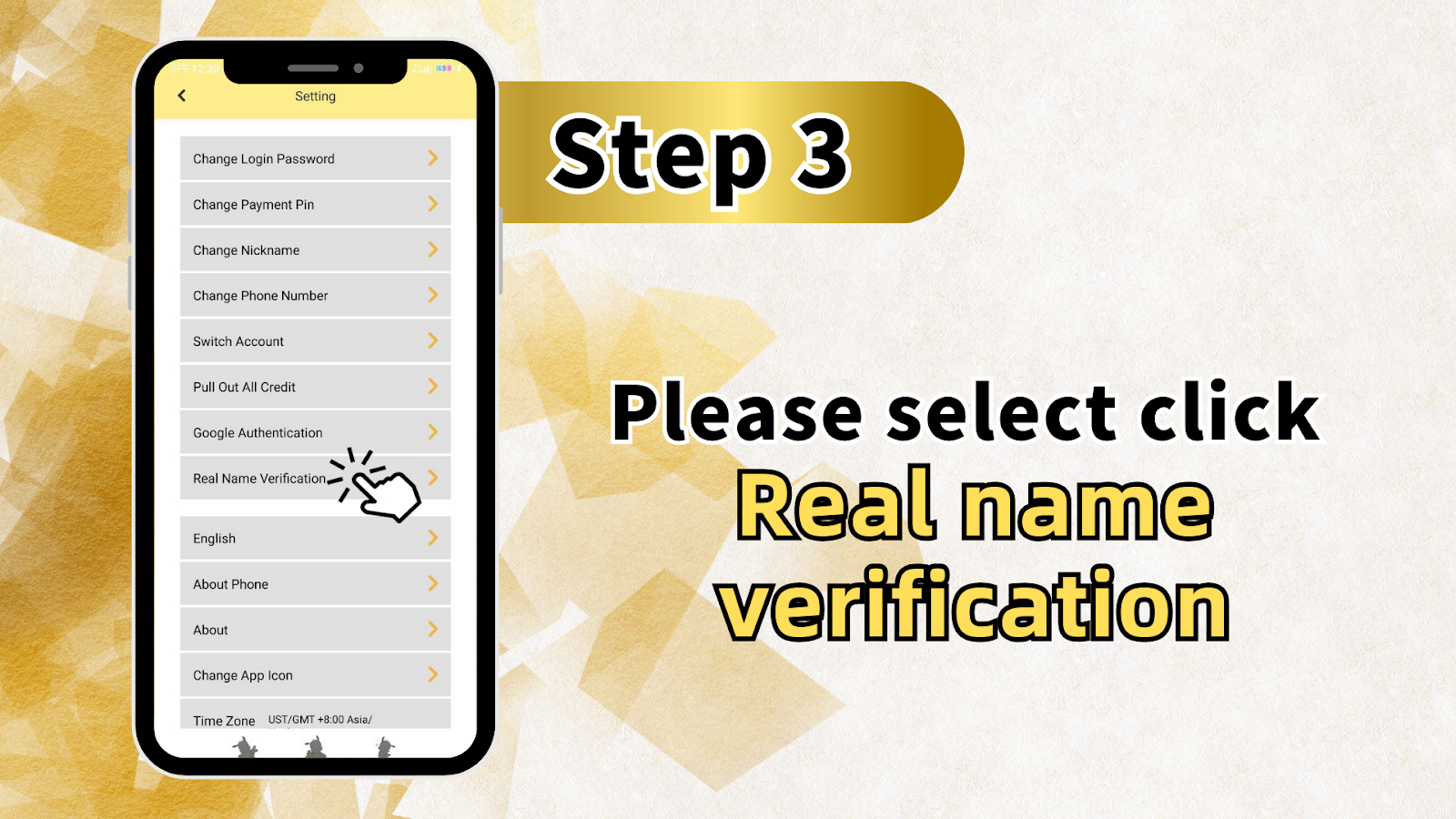
Step 3: Navigate to Real Name Verification
In the Settings menu, scroll through the list of options until you find "Real Name Verification". The full settings menu typically includes:
- Change Login Password
- Change Payment Pin
- Change Nickname
- Change Phone Number
- Switch Account
- Pull Out All Credit
- Google Authentication
- Real Name Verification (select this option)
- Language Setting (English)
- About Phone
- About
- Time Zone (US/TGMT +8:00 Asia/)
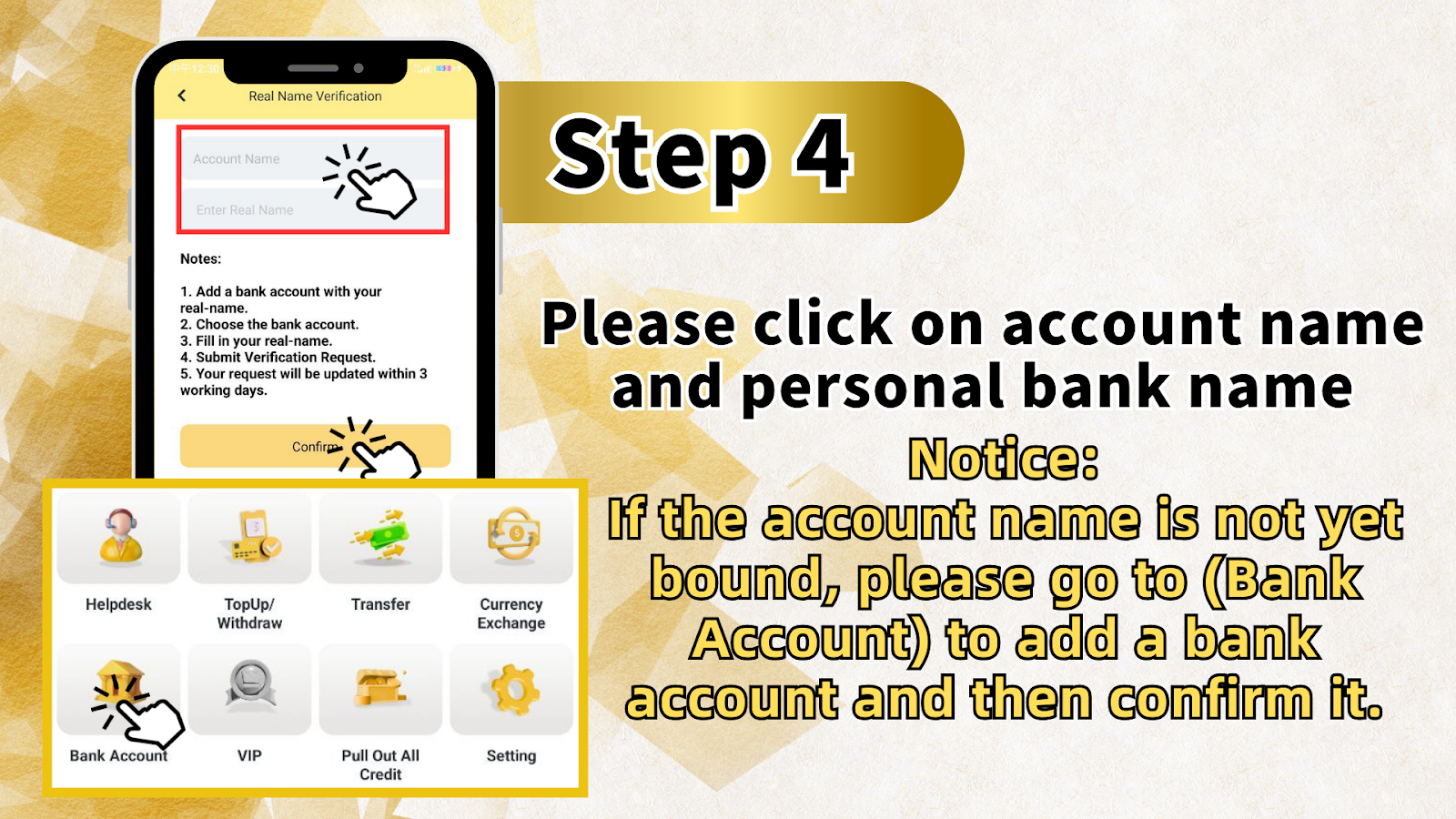
Step 4: Add a Bank Account (If Not Already Bound)
Important Prerequisite for LUCKYTOWN Verification
Before you can complete real name verification, you must have a bank account added to your LUCKYTOWN profile. If your account name is not yet bound to a bank account, you will need to complete this step first.
Navigate to the Bank Account Section
From the main menu or settings, go to "Bank Account". You can also access this through the bottom navigation options, which may include:
- Helpdesk
- TopUp/Withdraw
- Transfer
- Currency Exchange
- Bank Account
- VIP
- Pull Out All Credit
- Setting
Add Your Bank Account Details
Select "Bank Account" and carefully follow the prompts to add a bank account that is registered in your real name. It is crucial that the account name matches your legal name exactly, as this is the foundation for successful verification.
Step 5: Complete the Real Name Verification Form at LUCKYTOWN
Select Your Bank Account
Once your bank account is successfully added, return to the "Real Name Verification" page. You will be prompted to select the bank account you just added from a dropdown menu.
Enter Your Real Name
Enter your real name exactly as it appears on your chosen bank account and on your official identification documents. This information must match perfectly to avoid any delays in the verification process at LUCKY TOWN.
Submit Your Verification Request
After filling in all the required information accurately, tap the button to "Submit Verification Request". Your request will be securely sent to the LUCKYTOWN verification team for processing.
Step 6: Wait for Processing
Processing Time for LUCKYTOWN Verification
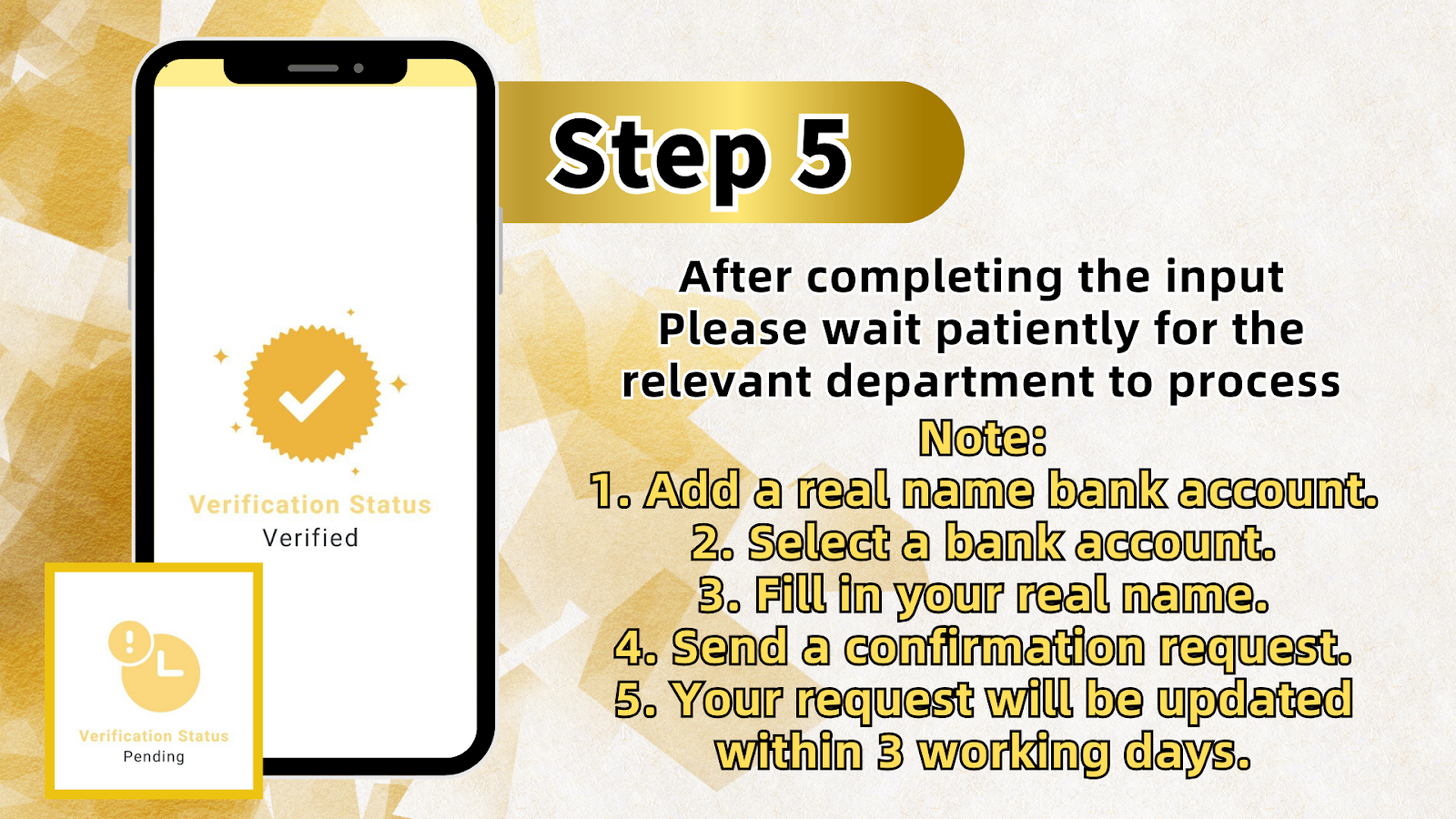
Once you have completed the input and submitted your request, please wait patiently for the relevant department to process your verification. LUCKYTOWN aims to process all verification requests as promptly as possible.
Expected Timeline for Completion
Your real name verification request will typically be updated within 3 working days. You will receive a notification once your verification is approved or if any additional information is required to complete the process.
Summary of Real Name Verification Steps at LUCKYTOWN
Quick Reference Checklist for LUCKYTOWN Members
Here is a quick summary of the real name verification process at LUCKYTOWN for your easy reference:
- Add a bank account with your real name.
- Select the bank account you just added from the list.
- Fill in your real name, ensuring it matches your bank account exactly.
- Submit your verification request.
- Wait for processing – your status will be updated within 3 working days.
Important Notes and Reminders for LUCKYTOWN Users
Account Name Must Match Bank Account Exactly
Please ensure that the name on your LUCKYTOWN account matches the name on your bank account. If the account name is not yet bound, please go to the "Bank Account" section to add a bank account first, then return to complete your verification.
Accuracy Is Essential for Successful Verification
Double-check all information before submitting your verification request. Any discrepancies between your submitted name and your bank account name may result in delays or the rejection of your verification attempt.
Patience During the Processing Period
The verification team at LUCKYTOWN processes requests as quickly as possible. Please allow up to 3 working days for your verification to be completed. You will receive a clear notification once the process is finished.
Frequently Asked Questions About Real Name Verification at LUCKYTOWN
Why do I need to verify my real name?
Real name verification at LUCKYTOWN is required for account security, fraud prevention, and regulatory compliance. It is also necessary to enable full access to platform features, including withdrawals and VIP privileges.
What documents do I need for verification?
For this initial verification step, you will need a valid bank account in your real name. The name on your bank account must match the name you enter during verification. No additional documents are required for this specific step.
How long does verification typically take?
Verification requests at LUCKYTOWN are typically processed within 3 working days. You will receive an in-app notification once your verification is complete.
What happens if my verification is rejected?
If your verification request is rejected, you will receive a notification explaining the reason. Common issues include name mismatches or problems with the bank account. You can correct the issue and submit a new request.
Can I use the LUCKYTOWN platform without verification?
While you can access some games and features without verification, completing real name verification at LUCKY TOWN is required for making withdrawals and accessing full account functionality. We recommend completing it as soon as possible.
Is my personal information secure during this process?
Yes. LUCKYTOWN uses industry-standard encryption and security measures to protect your personal information. Your data is handled according to strict privacy policies and is only used for verification and security purposes.
What if I don't have a bank account?
A bank account in your real name is required for verification at LUCKYTOWN. If you do not have one, you will need to open an account with a bank that serves your region before you can complete this verification step.
Can I change my bank account after verification?
Yes, you can update your bank account information through the "Bank Account" section at any time. However, please note that any changes may require additional verification checks to ensure the ongoing security of your account.
Who do I contact if I have issues with verification?
If you encounter any problems during the verification process, please contact LUCKYTOWN customer support through the "Helpdesk" option or by using the contact information provided within the app.
Complete Your Real Name Verification Today!
Don't wait – verify your real name at LUCKYTOWN now to unlock full account features, secure your funds, and enjoy faster withdrawals. Follow the simple step-by-step guide above and get verified in just a few minutes.
Verify Now at LUCKYTOWN